Features
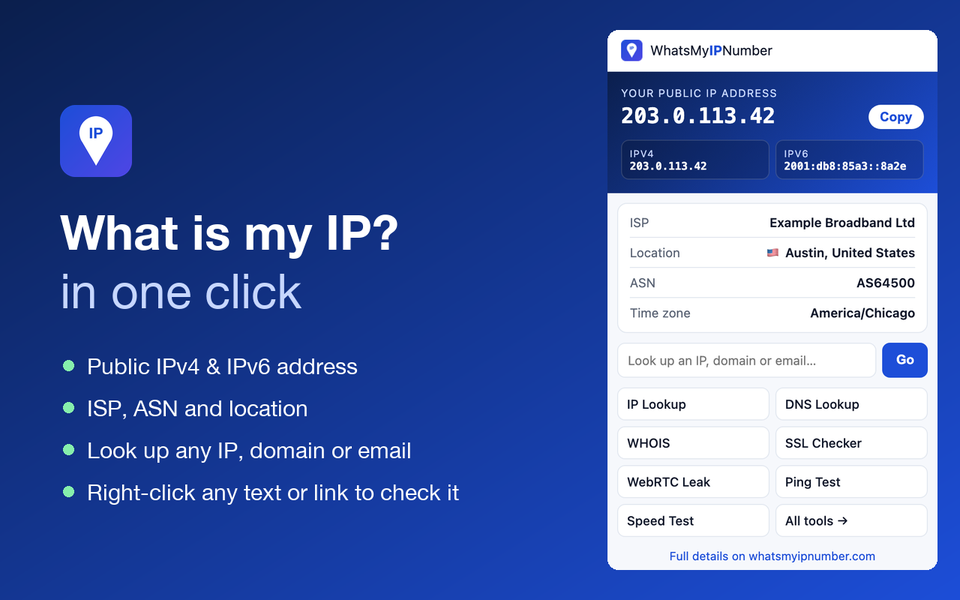
- Your IP instantly. Public IPv4 and IPv6 addresses with one-click copy, as soon as you open the popup.
- Connection details. Your ISP, ASN, city, country and time zone. Handy for confirming that your VPN is on.
- Quick lookup. Type any IP address, domain or email domain and jump straight to the right tool.
- Right-click lookups. Select an IP or domain on any page, right-click and choose Look up on WhatsMyIPNumber. Right-click a link to check its redirects.
- Address-bar shortcut. Type
ip, press space, then an IP or domain, and press Enter. - Private by design. No account, no tracking, no analytics. The only permission is
contextMenus, and the extension never reads the pages you visit.
How to install it manually
Until the Chrome Web Store listing is live, you can install the extension in under a minute:
- Download the extension zip and unzip it into a folder.
- Open
chrome://extensions(oredge://extensions,brave://extensions). - Turn on Developer mode in the top-right corner.
- Click Load unpacked and select the unzipped folder.
- Pin the WhatsMyIPNumber icon from the puzzle-piece menu so it is always one click away.
Why use an IP extension?
Checking your IP is something you do at important moments: right after connecting to a VPN, when setting up port forwarding, when a website blocks you by location, or when you are troubleshooting a connection. The extension turns that into a single click, and it doubles as a launcher for the 97 free tools on this site, from DNS lookups to SSL checks and the WebRTC leak test.
Frequently asked questions
Is the extension free?
Yes, completely free, with no account and no in-extension ads.
Does it work in Microsoft Edge, Brave and Opera?
Yes. They are all based on Chromium and can install Chrome extensions.
What data does it collect?
None. To show your IP, it asks our server and ipify, which necessarily see your IP address, and nothing is stored. See the privacy policy.
Is there a Firefox version?
Not yet. In the meantime, bookmark the home page, or use curl whatsmyipnumber.com/ip from a terminal.